Lifespan: 3 years
I bought this product barely 3 years ago, and it already no longer works! At that price, I thought it would last a bit longer!!! What a disappointment.
Review automatically translated


Pictures may differ from actual products

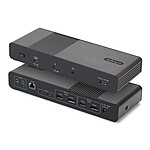
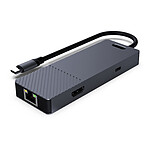
Create the perfect workstation with the Belkin Thunderbolt 4 Dock Pro. It features 12 ports so you can connect your MacBook or Windows laptop to multiple devices (video, Ethernet, power) via a single Thunderbolt 4 cable. Enjoy data transfers of up to 40 Gbps. Charge your laptop along with other connected devices with up to 90W of power delivery. Enjoy a smooth, crisp visual experience with incredible image resolutions and three connected displays. The included Thunderbolt 4 cable is compatible with Thunderbolt 3, USB-C and USB-4.

Enjoy easy access to your monitors, networks, power supplies and peripherals with the multitude of ports available on the station.
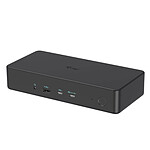
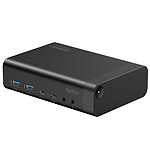
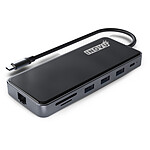
Front panel:
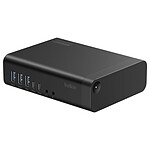
Rear panel :
This dock connects to your Thunderbolt 4 or USB-C laptop with a single cable, which is provided by Belkin by default. This 80 cm cable is long enough to bypass any obstacles or to move the dock away from the power outlet. Ideal for a desk with multiple configurations.
For a versatile workspace, the Belkin Thunderbolt 4 Dock Pro supports two high-definition monitors.


To be compatible with both Mac (Mac operating system) and PC (Windows) laptops, this dock features Intel's new chipset/controller, making the dock ideal for any business with both types of computers. The docking station is also perfect for work spaces such as meeting rooms, conference rooms, hotels and coworking spaces.
 Select your criteria
General information |
Product name |
Belkin Thunderbolt 4 Dock Pro |
Brand |
Belkin | |
Model |
INC006VFSGY | |
Technical specifications |
Width |
200 mm |
Height |
33.9 mm | |
Depth |
73.2 mm | |
Colour |
Black | |
Connector(s) available |
1 X Headphone (3.5mm Jack Female) | |
| 1 X Line IN/Microphone 3.5mm Jack Female | ||
| 1 X Gigabit Ethernet - RJ45 Female | ||
| 2 X USB 2.0 Type A Female | ||
| 2 X USB 3.1 Type A Female | ||
| 1 X USB 3.1 Type C Female | ||
| 1 X DisplayPort Female | ||
| 1 X Thunderbolt 4 | ||
| 1 X Thunderbolt 4/USB-C | ||
| 1 X SD (Secure Digital) | ||
| 1 X Thunderbolt 3 | ||
Interface with the computer |
Thunderbolt 4/USB-C | |
| Thunderbolt 3/USB-C | ||
Warranties |
Commercial warranty |
Seller 2 years
|
Legal warranty |
See terms & conditions
Harmonised legal guarantee notice

|
|
Safety Information |
Responsible person |
Belkin LTD |
Postal address |
Unit 1 Regent Park, NN8 6GR Wellingborough, GB | |
Electronic Address |
info@belkin.com |
See all Belkin products
Product referenced on 23 Jun 2022
I bought this product barely 3 years ago, and it already no longer works! At that price, I thought it would last a bit longer!!! What a disappointment.
I chose it above all for the aesthetics, it goes very well next to my ifi V2 DAC. I also appreciate having a detachable Thunderbolt cable for a good length and a tidy desk when I'm not using it. Unfortunately, I notice a few-second dropouts on the HDMI several times a day. The image comes back by itself but it's a shame.
I'd bought the same model before and it's brilliant. All the connections are there.
I move around a lot with my MacBook Pro and whether I'm in the office or at home, I connect it to the Thunderbolt box and everything's connected, even MBP charging. No need to have dozens of adapters to connect. Thanks Belkin. I'm just waiting for the model with the 10GbE network and that would be great.
1st little problem matching the resolution of my auxiliary screen with that of the host PC. You can't enjoy the maximum resolution (2560 x 1600) on the 2 screens at the same time.
2nd problem: for an additional wireless keyboard with a Logitech key, if the key is plugged into the dock, there are delays and therefore lost characters. You have to plug the key into the host PC.
Apart from that, everything's fine, and Ethernet transfers are very fast.
I bought this dock to improve my workstation and to be able to connect all my peripherals easily.
It allows me to keep all my setup when I switch from my business PC to my home PC.
Unfortunately, the dock isn't 'stable', the screen regularly cuts out for 2/3 seconds, the old outputs aren't well supported and sometimes the connection with the PC doesn't work the first time.
I was able to test with several machines.
What's more, LDLC has already replaced the dock for me once because it had completely stopped working.
And despite the replacement, I still have the same little faults.
As a developer who works a lot from home, it's restrictive.
Clearly I should have gone for another model like the Kensington SD5750T.